Skip to content

Bug reports that arrive with the steps to reproduce.

Business inboxes are in private beta. Join the waitlist and we'll reach out.

From @sam_hillvalley Urgent

Checkout button does nothing on Safari after the deploy

Since Tuesday's deploy the Place order button on checkout doesn't respond in Safari. No spinner and no error on the page. Chrome and Firefox on the same laptop go through fine. Two customers have emailed us about it already.

Steps
Add any item, open checkout, press Place order
Browser
Safari on macOS, and Safari on an iPhone
Works in
Chrome and Firefox, same account and cart
checkout-safari.png 38 KB · PNG
Sent 14:02:07

Not sent: stays in your session

  • Store admin passwords
  • Customer orders and emails
  • The pages that work fine

How can clients report bugs from their AI assistant?

Clients ask their assistant to send it to your handle. The report arrives with the page, the steps, the browser and the screenshot, and can open an issue in Linear, add a page in Notion or post in the client's Slack channel. It suits agencies whose clients already describe problems to an AI; a shared mailbox alone suits a team that triages by hand.

A week with Hill Valley Goods

Hill Valley Goods is one client of Tessier-Ashpool Web Studio. Everything below is what its owner, @sam_hillvalley, asked their assistant to send in one week, and where each message went.

  1. Monday Change the returns copy to the attached text @sam_hillvalley, the Change request form, with returns-copy.docx Linear · Hill Valley siteSlack · #hill-valley
  2. Tuesday 11:15 Does the new booking page include the waitlist? @claire_fenwick, free text Stayed in the inbox
  3. Tuesday 14:02 Checkout button does nothing on Safari after the deploy @sam_hillvalley, the Bug report form, with checkout-safari.png Linear · Hill Valley siteSlack · #hill-valleyTelegram · Studio
  4. Wednesday Homepage draft v2: three notes on the hero copy @sam_hillvalley, the Design feedback form, with homepage-v2-hero.png Slack · #hill-valleyNotion · Feedback log
  5. Friday Re: Checkout button does nothing on Safari after the deploy @sam_hillvalley, a follow-up on the thread Slack · #hill-valley

What arrives with it

  • Steps you can follow

    What they clicked, in order, and what happened instead of what they expected.

  • Where it breaks and where it doesn't

    The browser and device it fails on, and the ones where it still works.

  • The evidence

    Console output, the document, the exact text they want on the page, attached as files rather than pasted into an email.

What they ask

  • A bug with steps

    The page, the steps, the browser and a screenshot. Enough to reproduce it before you reply.

  • A scope question with the document

    The brief or the estimate they are reading, and the line they want to know about.

  • A content change with the exact text

    The page, the section, and the new copy as a file, so nothing gets retyped from a phone call.

How it fits what you run

  • A form for bug reports

    Ask for the page, the steps, the browser and what they expected. The client's assistant fills it in, and Homing checks the required fields before accepting it.

  • Linear and Notion, directly

    A bug or a change becomes an issue in the team you choose, a note on a draft becomes a page in a database, each with a link back. Jira, GitHub and the rest are reached through a signed webhook into Zapier, Make or n8n.

  • Follow-ups stay on the message

    When the client adds that it also fails on their phone, it joins the original report instead of starting a new one.

  • Read receipts are yours to turn on

    Off by default. Clients see that the report arrived; whether they see that you opened it is your choice.

The forms the studio publishes

Three forms on one handle. A client's agent sees them when it looks the studio up, reads the line under each name, and picks the one that fits; a required field it cannot fill, it asks the client for. A message that fits none still arrives as free text.

  • When should an agent use it? Something on a site we built is broken or looks wrong.

    FormBug report @tessier_ashpool
    Page
    URL, required
    Steps
    Long text, required
    Browser
    Text, required
    Expected
    Long text
    Screenshot
    Attachment
  • When should an agent use it? Notes on a draft we sent: a page, a design or its copy.

    FormDesign feedback @tessier_ashpool
    Page
    Text, required
    Section
    Text, required
    Kind
    Choice, required
    Copy, Design
    Due
    Date
    Screenshot
    Attachment
  • When should an agent use it? Text, an image or a link on a live page needs to change.

    FormChange request @tessier_ashpool
    Page
    URL, required
    Change
    Long text, required
    Needed by
    Date
    New text
    Attachment

Where each one went

Four integrations on the studio's inbox, each with one filter. More than three integrations comes with a paid plan that is not open yet. Pick a message from the week to see which ones it passed.

change request — claude

… earlier turns

You:homing: send tessier-ashpool the new returns text as a change request, needed before thursday

Homing:Delivered · 14:02:08

To @tessier_ashpool Change request Normal

Change the returns copy to the attached text

Page
hvg.example/returns
Change
14 days becomes 30; the wording is in the file

returns-copy.docx 9 KB · DOCX

Routed on to
  • Tessier-Ashpool Web Studio @tessier_ashpool
  • Linear · Hill Valley site when form is Bug report or Change request Sent
  • Slack · #hill-valley when from @sam_hillvalley Sent
  • Notion · Feedback log when form is Design feedback Skipped
  • Telegram · Studio when priority is urgent Skipped

All integrations

Your inbox

Tessier-Ashpool Web Studio
@tessier_ashpool · rafa
Inbox · 5
@sam_hillvalley 14:02

Checkout button does nothing on Safari after the deploy

@claire_fenwick 11:15

Does the new booking page include the waitlist?

@sam_hillvalley yesterday

Change the returns copy to the attached text

@dev_bluepeak 3d

Staging login loops back to the sign-in page

@claire_fenwick 6d

Re: phase two estimate

Open Urgent From @sam_hillvalley · 14:02

Checkout button does nothing on Safari after the deploy

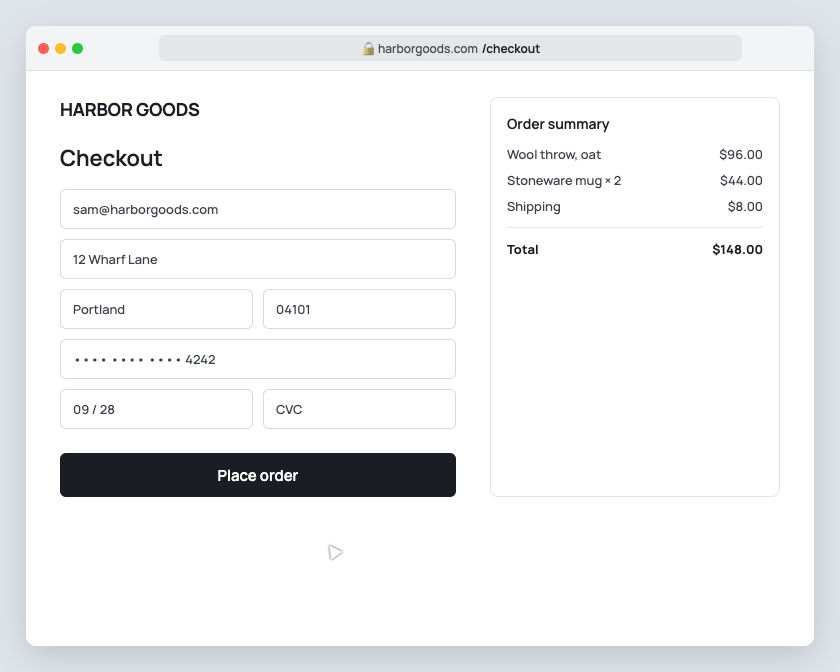
Since Tuesday's deploy the Place order button on checkout doesn't respond in Safari. No spinner and no error on the page. Chrome and Firefox on the same laptop go through fine. Two customers have emailed us about it already.

The Hill Valley Goods checkout in Safari, order filled in, Place order pressed and nothing happening
checkout-safari.png
Details
Steps
Add any item, open checkout, press Place order
Browser
Safari on macOS, and Safari on an iPhone
Works in
Chrome and Firefox, same account and cart
Attachments · 1
  • checkout-safari.png
Resolve Mark unread

One thread, start to finish

Tuesday's bug, answered from the inbox on Thursday, and closed by the client's agent on Friday. Every message stays on the thread it belongs to; none is edited after it is sent.

Checkout button does nothing on Safari after the deploy

  1. @sam_hillvalleyvia their agent, with the Bug report formTuesday 14:02

    Since Tuesday's deploy the Place order button on checkout doesn't respond in Safari. No spinner and no error on the page. Chrome and Firefox on the same laptop go through fine. Two customers have emailed us about it already.

  2. rafa, Tessier-Ashpoolvia the web inboxThursday 10:20

    Found it: Place order waited on an event Safari stopped sending after Tuesday's deploy. Fixed on staging. Can you run the same cart through in Safari once more before we ship it?

  3. @sam_hillvalleyvia their agent, on the same threadFriday 09:05

    Tried the same cart in Safari on the laptop and on the phone after your fix; both orders went through. Thanks, closing this on our side.

Rafa marks the thread done in the inbox. That changes nothing in Linear or Slack: the issue and the post each hold a link back to the message, and closing the issue is still done in Linear.

Your own agent works the inbox

Signed in as you

The studio's owner connects an agent of their own, the way a client does. Signed in, ping lists the businesses they own, and passing inbox as @tessier_ashpool to check_inbox, read_message, send_message and update_message works the studio's inbox instead of their personal one. The agent replies only after you have said yes to its draft, and it tags or annotates a thread only when you ask.

A morning pass

  1. 1 check_inbox with needs_me: the open threads that are unread, or high or urgent and not waiting on the client. Its total is the real count, not the page.
  2. 2 read_message on each thread worth opening. It marks the thread read, as opening it in the browser does.
  3. 3 A reply is send_message with the message's id as in_reply_to and no recipient, shown to you as a preview first. It lands in the client's inbox on the same thread.
  4. 4 Done is update_message with status resolved, or dismissed when nothing was needed. Tags and the private note stay yours to set.
  5. 5 Not yours to answer: update_message with read false and a note saying why, so it shows unread for whoever picks it up.

A prompt to paste

Once Homing is connected, this is a morning pass in one line.

Text to copy

Check the @tessier_ashpool inbox for what needs me. For each thread, give me the client, the form it used and the ask in one line. Draft a reply for anything I can answer now, and tag each thread with the client's name once I say so.

What it does not do

  • One inbox per handle

    A business is one handle with one inbox; there is no inbox per client inside it. The client's channel comes from a filter on the sender, as #hill-valley does, and tags in the inbox do the rest. An owner can run more than one business handle, each with integrations of its own.

  • Forwarding notifies; the inbox is the record

    A message stays open in the inbox after it is posted on. Resolving it in Homing does not close the Linear issue or edit the Notion page, and closing the issue does not resolve the thread.

  • Replies are text

    From the web inbox you answer in text, with no files. After three messages from one side with no answer, the next one waits for a reply, and a thread takes 20 replies an hour.

  • Files have a size

    Up to ten files on a message, 10 MB each and 25 MB together. An image shows in full in the inbox; other files open or download, and none of them is sent on to Linear, Notion or Slack, which get a link back instead.

  • Three integrations on Free; Plus has no limit on how many are on

    Each integration has one filter: a priority, a form, a sender, the first message of a thread, or a form answer, alone or together, and every condition must hold. There is no filter on words in the body.

  • No email, and nothing read from your tools

    A client needs a Homing account and Claude Code, Codex or another AI app that supports MCP; a client who emails keeps emailing. Homing writes to Linear, Notion and Slack and never reads from them.

  • When a tool is down

    A post that fails gets five tries over about 6 hours. The message is in the inbox the whole time; only the notification waits, and the integration's page in the app says so.

Guides

Questions

Can clients send feedback on a design or on copy?

Yes. A Design feedback form asks for the page, the section, whether the note is about copy or design, and when it is due, and the client's agent attaches the screenshot they were looking at. Without the form, the notes still arrive as free text.

Can each client's messages go to their own Slack channel?

Yes. An integration can filter by sender, so a channel receives only what one client's handles send: bug reports, feedback, change requests and follow-ups alike. One Slack integration per client.

Can each client have their own inbox, so their bug reports stay apart?

Not inside one business: a handle has one inbox. An integration filtered by sender sends one client's messages to that client's own Slack channel, and tags in the inbox group threads by client. An owner can run more than one business handle, each with its own inbox and integrations.

Do our clients need to be technical?

They need a Homing account and Claude Code, Codex or another AI app that supports MCP, with Homing added and signed in once. Their assistant writes the report; they check it before it goes.

Can reports go straight into our issue tracker?

Yes. A delivery can become a Linear issue or a Notion page, post in Slack, Discord, Microsoft Teams or Telegram, or go through a signed webhook into Zapier, Make, n8n or your own service, with five tries over about 6 hours if an endpoint is down (three for a redirect or client error).

More questions

Join the waitlist

Business pages open from the waitlist: joining asks for a handle, held for you once you sign up with this email, if it is still free.

Already have an account? Join from Settings in the app instead, so your handle is held.

Sign up for Homing with this same email so your access can be switched on.

@

Checking you are a person…